The important days, included.
Regional UK public holidays, substitute days and your own special dates, with colours and labels you control.
Bundled confirmed UK holiday data covers 2025–2028.

Software Downloads & Releases

Calendar Wizard
FOR ADOBE INDESIGN
Build the calendar. Make it yours.
Create monthly calendars and yearly planners, then finish every detail in Adobe InDesign.
£1 one-time purchase · Bug fixes & minor improvements included
01 One month or a whole year
02 Your colours. Your type.
03 Editable in InDesign
FIND YOUR STARTING POINT
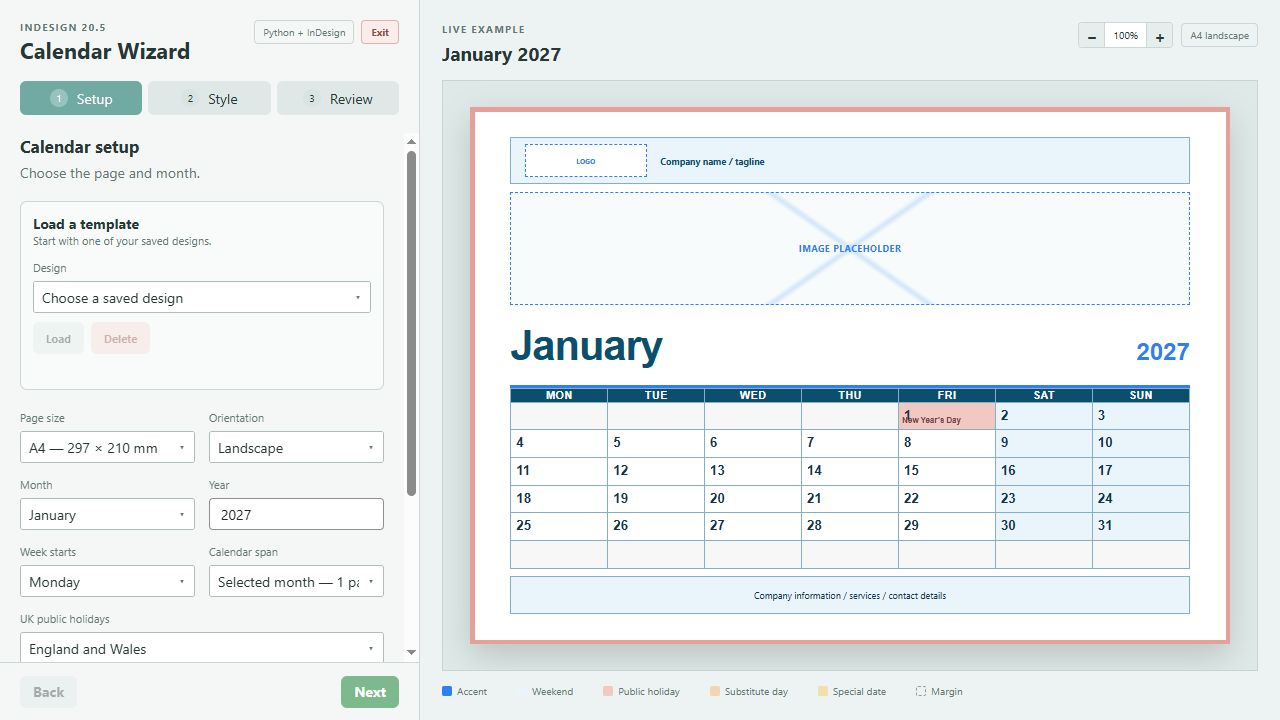
Start with a classic grid, give dates room to breathe, or see the whole year at once. These are real screenshots from the wizard.
Classic Grid — a familiar starting point with full calendar rules.
Wizard screenshot · Open image to enlargeAlso includes Open Rows, Date Boxes and Minimal Type, plus Columns for yearly planners. Image and logo guides become empty artwork frames in InDesign.
Regional UK public holidays, substitute days and your own special dates, with colours and labels you control.
Bundled confirmed UK holiday data covers 2025–2028.
Choose fonts, colours, headings, margins and page sizes. Size image placeholders across the page including bleed, add a full-page background image with fitting and scale controls, and float month headings with an adjustable gap.
Save named templates and return to them for your next calendar. Your designs and uploaded background images stay on your computer.
FROM SETUP TO INDESIGN
The wizard creates the structure. InDesign gives you the freedom to finish it.
Choose your year, page size, layout and dates. Preview one month, 12 pages or a yearly planner.
Press Send to InDesign, then Generate latest Python setup in the Calendar Wizard panel.
Place your images and logo. Refine editable text, frames, styles and artwork directly in InDesign.
A SMALL PRICE. A USEFUL HEAD START.
The Windows application, InDesign plugin installer and getting-started instructions in one download.
BEFORE YOU BEGIN
You'll need Windows, Adobe InDesign 20.5 and Creative Cloud Desktop for the plugin installation.
Adobe software is not included. No Python installation or UXP Developer Tool is required.
The current executable is unsigned, so Windows may display an unknown-publisher prompt. When finished, use the wizard's Exit button and confirm.
A FEW USEFUL DETAILS
For installation questions, download problems or refund requests, contact CoatX through Payhip. Please include your product name and order reference, but never your payment-card details.
Yes. The wizard generates InDesign text, calendar objects, styles and artwork frames. You place photographs and logos and complete the design inside InDesign.
The installed wizard runs locally on your computer and uses bundled calendar data. Downloading, payment and Adobe installation or sign-in may need an internet connection.
Close the previous wizard using Exit, keep a backup of your saved designs, then extract the new release into its own folder. For version 0.15.0, install the included updated CCX plugin and restart InDesign after saving your work. Confirm Version 0.15.0 at the bottom left of the wizard. Saved templates normally remain under your Windows Local AppData folder, outside the application folder.
Bug fixes and minor improvements are included in your £1 purchase. A substantially developed, completely new version may require a separate purchase.
Version 0.15.0: Calendar Wizard.exe, Install Calendar Wizard.ccx and README.txt. The ZIP is 15.49 MB (15,490,044 bytes).
ZIP SHA-256
CE66C42B972124E02C1490768CA10AFC1DD0110279650DA6745F3AF8A49D9D72
The bundled confirmed data covers 2025–2028 for England and Wales, Scotland and Northern Ireland. Outside that range, turn off UK public holidays and add your own confirmed dates, or use a later release with updated holiday data.
Calendar Wizard · Independent software for creative work.
Adobe and InDesign are trademarks of Adobe. Calendar Wizard is an independent product.