The paper routine
Print invoices. Find delivery notes. Stamp pages. Sort the pile. Assemble the folder. Find somewhere to keep it.

LEDGER-PREP · FOR WINDOWS
Collect, check and digitally stamp your purchase documents. Build an organised PDF handover for accounts as the month progresses.
See the daily workflow ↓Automated purchase ledger collation
01 Less printing and filing
02 Supporting documents together
03 Ready throughout the month
SEE IT IN ACTION
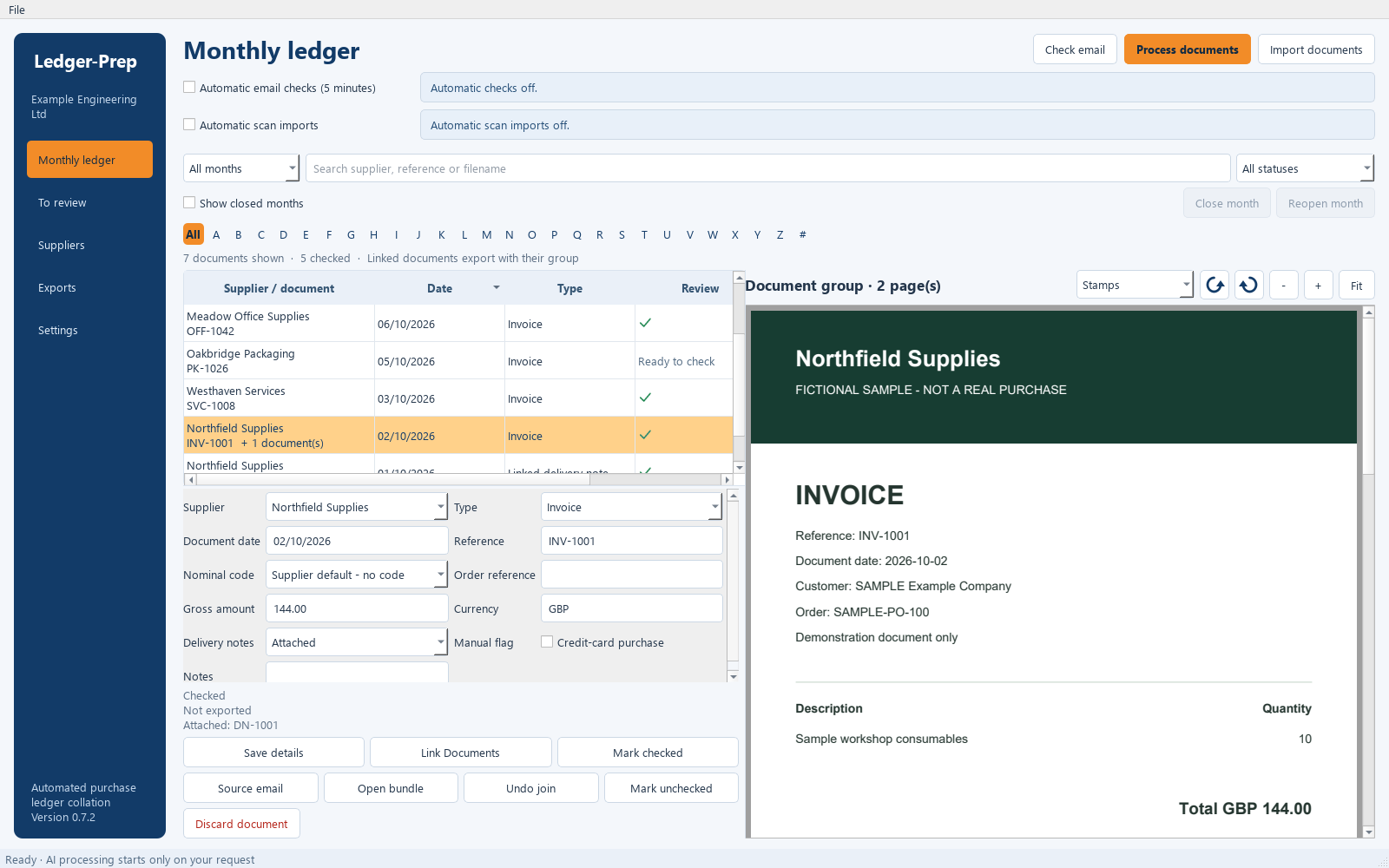
Review the document alongside its details, keep delivery notes with invoices and prepare the next accounts handover.
Real application screens using fictional data. Select an image to enlarge it.
THROUGHOUT YOUR WORKING DAY
Keep the paperwork moving as it arrives, from the morning inbox to the next accounts handover.
Check your configured mailbox, import saved files or collect documents from your scan folder. Optional automatic collection runs while the app is open.
Check supplier, date, reference, amount and nominal code beside the document. Optional AI helps suggest details and matches for your review.
Attach delivery notes to their invoice, including notes from an earlier month. Open the complete bundle when you need the full picture.
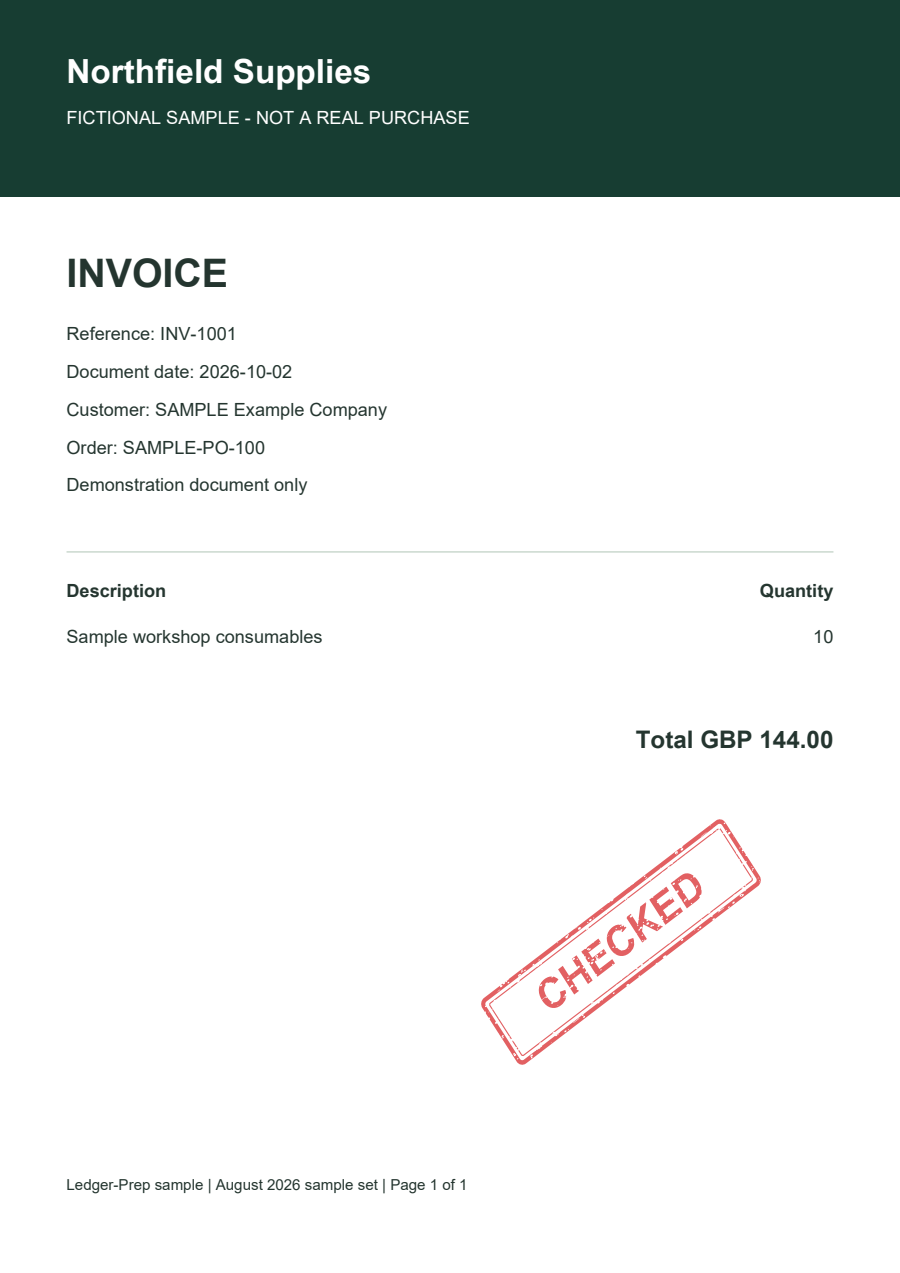
Choose a stamp, drag it into place and save it. Add a nominal code or saved notes so accounts can see the instruction on the page.
Mark reviewed documents checked and create a PDF handover. Send a batch today and another later, skipping unchanged documents already exported.
Review outstanding items, complete the remaining handover and close the month when ready. The preparation has been building all month.
FAMILIAR STAMPS. DIGITAL DOCUMENTS.
PAID. CHECKED. ON HOLD. The familiar office stamp, placed directly on your document preview and included in your next PDF handover.
Insert saved document notes when accounts needs more detail. Choose the page, position the stamp and click Save stamp.
Originals remain unchanged. Stamps are visual annotations; they do not record payments, set the credit-card flag or replace Mark checked. Changes require another check before export.
RETHINK THE MONTHLY FOLDER
No more assembling a large hardcopy purchase ledger folder at the end of every month. Prepare the documents as you go and hand over organised PDFs when accounts needs them.
Print invoices. Find delivery notes. Stamp pages. Sort the pile. Assemble the folder. Find somewhere to keep it.
Collect digitally. Review and link. Save your stamps. Mark checked. Create the handover and copy it to the chosen accounts folders.
PDF bundles put the invoice first, followed by its linked documents. New handovers include saved stamps and use recognisable supplier, reference and date filenames.
LESS REPEATED WORK
Spend less time handling paper and searching for supporting documents. Actual savings depend on your volume and existing process.
Keep electronic invoices digital. Scan paper documents into the same workflow and reduce printing, hole-punching and filing.
Find documents by supplier or reference, with supporting delivery notes linked to the invoice.
Generate further batches without exporting unchanged documents again. Amended documents can be handed over after rechecking.
No. Ledger-Prep prepares purchase documents for accounts. It does not make payments or post transactions into an accounting system.
No. You can enter and review document details manually. Optional AI processing requires a configured provider and may incur provider charges. You remain responsible for checking details and approving proposed joins.
Yes. Standard exports include newly checked documents and amended documents checked again, while skipping unchanged previous exports. Copy batches to the same chosen destinations as the month progresses.
A 64-bit Windows PC running Windows 10 22H2 or later. Configure storage and the optional mailbox, scan-folder and AI connections you want to use. Mailbox collection and AI require internet access; cloud-folder synchronisation is handled separately by your cloud software.
Visit the Ledger-Prep section on COATX. The current 0.7.5 release is unsigned early access, so Windows may display an unknown-publisher warning.
GET LEDGER-PREP
Ledger-Prep 0.7.5 · Windows 10 22H2 or later, 64-bit · 42.2 MB installer
Download Ledger-Prep 0.7.5 ↓Unsigned early access. Windows may display an unknown-publisher warning. Existing users can also check for updates in Settings → Software Updates.